Use Server-Sent Events in Spring MVC
Server-Sent Events (SSE) let a server push a continuous stream of updates to the browser over a single long-lived HTTP connection. Spring has supported them since version 4.2 through the SseEmitter class, and the API has been stable ever since. This post is a practical how-to: we start with a bare SseEmitter, then build the setup I actually use in production, streaming events from a message queue to the browser.
Note: This post has been updated for current Spring (5.x/6.x), with or without Spring Boot.
SseEmitteris a plain Spring MVC feature and needs no extra dependency. It was originally written against the Spring 4.2 RC2 milestone build before it reached Maven Central, so the original walked through configuring a milestone repository and enabling async support by hand; neither is needed now.
What are Server-Sent Events?
Server-Sent Events are a W3C/WHATWG standard describing how a server keeps sending data to a client after the initial connection is established. The response uses the text/event-stream content type, and the browser consumes it through the EventSource JavaScript API. Unlike WebSockets, the channel is one-way (server to client only), which makes it a natural fit for notifications, progress updates, and live feeds.
Every modern browser supports SSE. The notable exception was Internet Explorer, which never implemented EventSource; since IE is now end-of-life, this rarely matters in practice. If you must support a legacy client, Spring’s WebSocket messaging with SockJS fallback is the usual alternative.
Streaming from a Spring controller
A controller method returns an SseEmitter instead of a normal response body. Spring keeps the request open and streams whatever you write to the emitter, formatted as SSE events.
@GetMapping(path = "/messages", produces = MediaType.TEXT_EVENT_STREAM_VALUE)
public SseEmitter getRealTimeMessages() {
    SseEmitter sseEmitter = new SseEmitter();
    // Save the emitter somewhere so another thread can reach it later.
    return sseEmitter;
}
The point is that you return the emitter rather than sending everything inline: once the controller returns, the request thread is freed, but the connection stays open. You then push data from wherever it actually originates, typically another thread:
// In some other thread, when you have something to send:
sseEmitter.send("Message #1");
sseEmitter.send("Message #2");

// When there is nothing more to send, close the stream:
sseEmitter.complete();
SseEmitter is part of Spring MVC (spring-webmvc), so you do not need Spring Boot for any of this. The only environment difference is async support: a classic web.xml deployment has to enable it on the dispatcher servlet (<async-supported>true</async-supported>), whereas Spring Boot registers the servlet for you with async already on. That, plus an embedded server and managed dependency versions, is all Boot buys you here; the streaming code is identical either way.
Pushing events from a message queue
That “another thread” is the interesting part of any real application. In a project of mine I use ActiveMQ to talk to a separate judging process. When a result lands on the queue, ActiveMQ invokes my onMessage() listener, and I want to push that result to whichever browser is waiting for it. The catch is that the code receiving the message (a JMS listener) is nowhere near the code holding the SseEmitter (the controller). Spring’s application events connect the two without coupling them.
The flow is: JMS message → publish an event → an @EventListener catches it → write to the matching SseEmitter.
The JMS listener does not touch the emitter at all. It just publishes a plain event through ApplicationEventPublisher:
@Component
public class MessageReceiver implements MessageListener {
    @Override
    public void onMessage(Message message) {
        if (message instanceof MapMessage mapMessage) {
            try {
                long submissionId = mapMessage.getLong("submissionId");
                eventPublisher.publishEvent(new SubmissionEvent(submissionId, "Message"));
            } catch (JMSException ex) {
                LOGGER.catching(ex);
            }
        }
    }

    @Autowired
    private ApplicationEventPublisher eventPublisher;
}
The event itself is just a record. Notice it does not extend ApplicationEvent: since Spring 4.2, publishEvent accepts any object and wraps non-event payloads automatically, so a plain value type is enough.
public record SubmissionEvent(long submissionId, String message) {}
On the receiving end, a bean with an @EventListener method picks up that event by its parameter type, looks up the emitter registered for the submission, and sends the message:
@Component
public class SubmissionEventListener {
    @EventListener
    public void onSubmissionEvent(SubmissionEvent event) throws IOException {
        SseEmitter emitter = emitters.get(event.submissionId());
        if (emitter == null) {
            LOGGER.warn("No SseEmitter for submission #{}.", event.submissionId());
            return;
        }
        emitter.send(event.message());
    }

    public void register(long submissionId, SseEmitter emitter) {
        emitters.put(submissionId, emitter);
    }

    public void remove(long submissionId) {
        emitters.remove(submissionId);
    }

    // submissionId -> the emitter streaming to that submission's browser
    private final Map<Long, SseEmitter> emitters = new ConcurrentHashMap<>();
}
Finally, the controller creates an SseEmitter, registers it under the submission’s id, and returns it:
@GetMapping(path = "/messages", produces = MediaType.TEXT_EVENT_STREAM_VALUE)
public SseEmitter getRealTimeMessages(@RequestParam long submissionId) {
    if (submissionService.getSubmission(submissionId) == null) {
        throw new ResourceNotFoundException();
    }

    SseEmitter emitter = new SseEmitter();
    // Always clean up, or the map leaks an emitter per disconnected client.
    emitter.onCompletion(() -> listener.remove(submissionId));
    emitter.onTimeout(() -> listener.remove(submissionId));
    emitter.onError(e -> listener.remove(submissionId));
    listener.register(submissionId, emitter);
    return emitter;
}
Those onCompletion / onTimeout / onError callbacks are easy to forget and important to get right. When a browser closes the tab or the connection times out, the emitter is finished, but its entry stays in the map; without removing it, every disconnected client leaks an SseEmitter. (ConcurrentHashMap gives the thread-safe access this needs, since the listener thread and request threads touch the map concurrently.)
Consuming the stream in the browser
On the browser side there is no library to install. Open an EventSource against the endpoint and handle each message as it arrives:
const source = new EventSource("/messages?submissionId=42");
source.onmessage = (event) => {
    console.log("Received:", event.data);
};
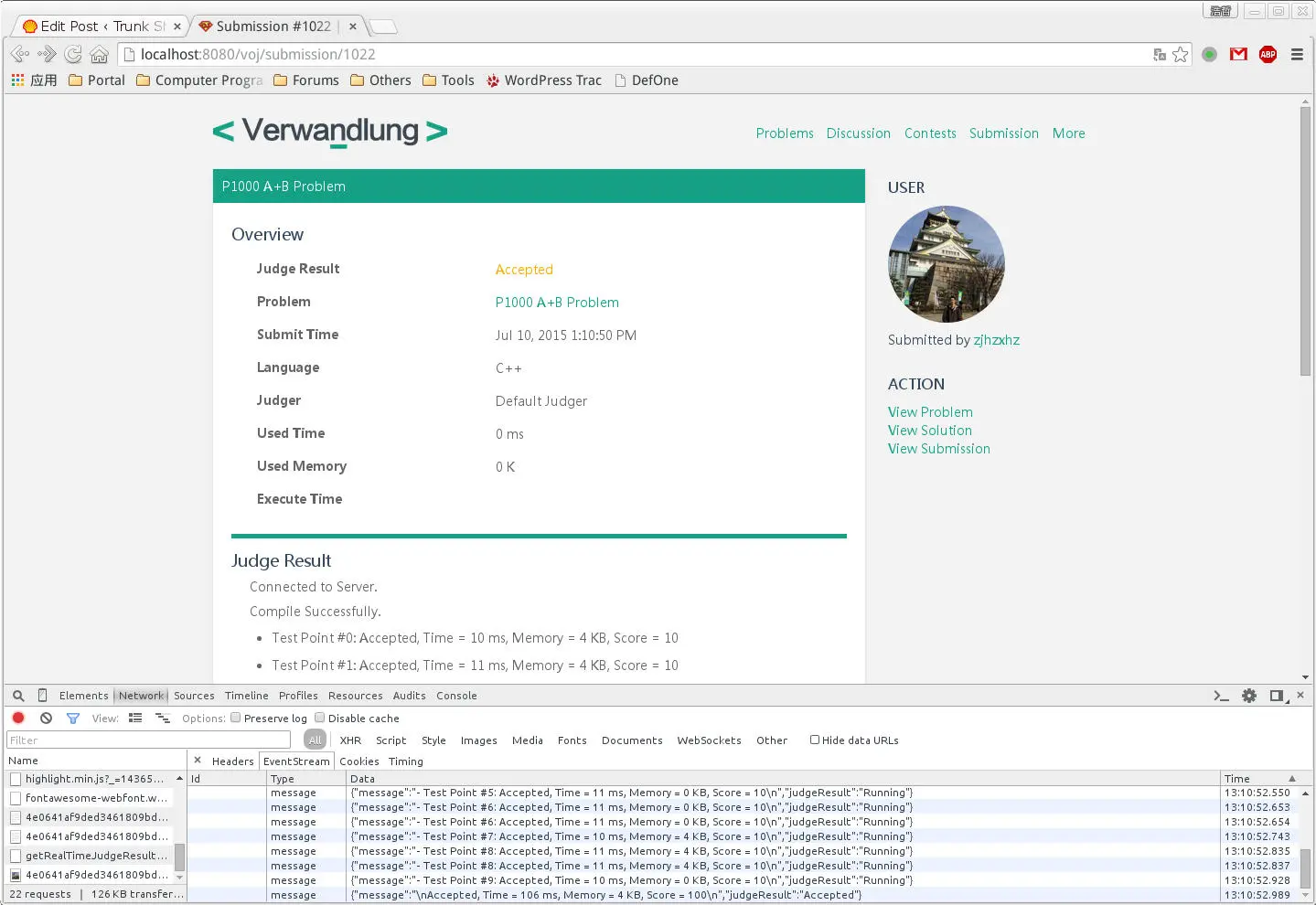
Each send(...) on the server fires one onmessage on the client, in order, until the server calls complete(). The result looks like this:
Conclusion
SseEmitter paired with application events gives you a clean, push-based pipeline: the component that produces data (a JMS listener, a scheduled job, anything) publishes an event and stays ignorant of HTTP, while a small listener fans those events out to the connected clients. The one thing to stay disciplined about is emitter lifecycle. The full working example lives in the VOJ project on GitHub.
The Disqus comment system is loading ...
If the message does not appear, please check your Disqus configuration.